Why Regular Website Maintenance Matters in 2026: PHP Vulnerabilities, Gravity Forms Flaws and Your Checklist
Your website is never really “finished.” Behind every contact form, plugin and page is software that keeps changing, and attackers watch those changes closely. In 2026, skipping regular maintenance is no longer a small risk you can put off. It’s one of the fastest ways to lose leads, rankings and customer trust. Here’s what regular website maintenance covers, the real threats from the past year, and a checklist you can use today.
The Threat Landscape Is Moving Faster Than Ever
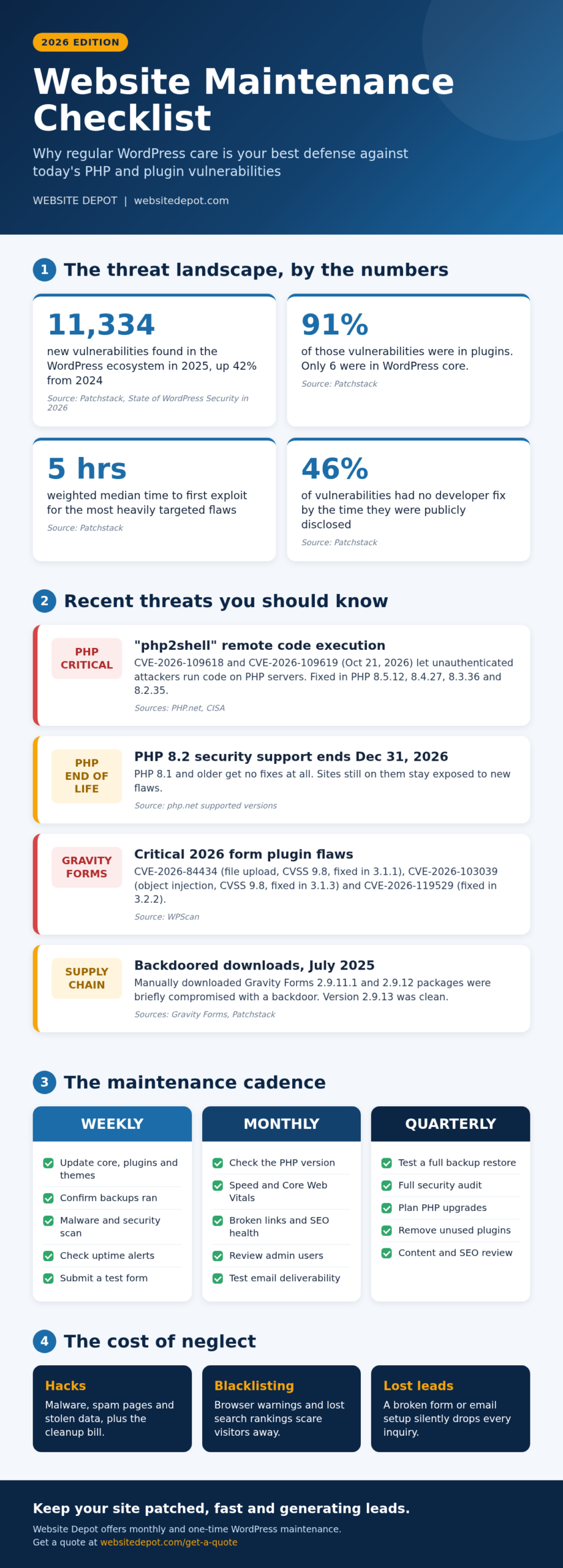
According to Patchstack’s State of WordPress Security in 2026 report, researchers found 11,334 new vulnerabilities in the WordPress ecosystem in 2025, a 42% increase over 2024. A few more numbers from the same report stand out:
- 91% of new vulnerabilities were in plugins and 9% in themes. Only six were found in WordPress core, and those were low priority.
- More high-severity vulnerabilities were found in 2025 than in the previous two years combined.
- For the most heavily targeted flaws, the weighted median time to first exploit was about 5 hours. Roughly half of high-impact vulnerabilities were exploited within 24 hours.
- 46% of vulnerabilities had no fix from the developer when they were publicly disclosed.
The takeaway is simple. WordPress itself is solid, but the plugins and server software around it need constant attention. An update that sits waiting for a month leaves a window attackers can use within hours.
Recent Threats Every Site Owner Should Know
PHP “php2shell”: Critical Remote Code Execution
PHP is the language WordPress runs on, so a flaw in PHP affects nearly every WordPress site. On October 21, 2026, the PHP project released emergency updates for two critical vulnerabilities, CVE-2026-109618 and CVE-2026-109619. As The PHP Foundation explains, under the right conditions they let an unauthenticated attacker run code on the server. CISA, the U.S. Cybersecurity and Infrastructure Security Agency, urged organizations to patch immediately and added both flaws to its Known Exploited Vulnerabilities catalog on October 26, 2026.
The fixed versions are PHP 8.5.12, 8.4.27, 8.3.36 and 8.2.35. If your host or developer hasn’t confirmed you’re on one of these (or newer), it’s time to ask.
Old PHP Versions Stop Getting Fixes
Every PHP branch has an end date. According to the official PHP supported versions page, security support for PHP 8.2 ends on December 31, 2026. PHP 8.1 and older already receive no fixes at all, which means a flaw like php2shell stays open on those servers. Planning a PHP upgrade, and testing your theme and plugins against it, is a core part of maintenance.
Gravity Forms: A Busy Year of Security Fixes
Gravity Forms powers contact and quote forms on a huge number of business websites, which makes it an attractive target. The WPScan vulnerability database lists several serious issues fixed in 2026, including:
- CVE-2026-84434: unauthenticated arbitrary file upload via a hidden file upload field (CVSS 9.8, critical), fixed in 3.1.1.
- CVE-2026-103039: unauthenticated PHP object injection via a post custom field (CVSS 9.8, critical), fixed in 3.1.3.
- CVE-2026-119529: unauthenticated local file inclusion via chunked file upload, fixed in 3.2.2.
Wordfence also reported CVE-2026-19513, a file upload flaw fixed in 3.0.3 that could lead to remote code execution on some server setups. The pattern is clear: if your forms plugin is a few versions behind, your site may be exposed through the very page you use to collect leads.
Supply-Chain Attacks: When the Download Itself Is Compromised
In July 2025, Gravity Forms published a security incident notice: for a short window, manually downloaded packages of versions 2.9.11.1 and 2.9.12 were modified with malicious code. Patchstack’s analysis found a backdoor that could create admin accounts, upload files and run code remotely. Sites that received the update through the normal WordPress dashboard auto-update weren’t affected, and version 2.9.13 was released clean. This is a good example of why how you update matters, and why clean, dated backups are essential.
What Regular Website Maintenance Covers
Good maintenance is more than clicking “Update all.” A complete plan includes:
- Core, plugin and theme updates, applied promptly through trusted channels and checked afterward.
- PHP version management, keeping the server on a supported, patched release.
- Backups, stored off-site, with restores actually tested.
- Security scans for malware, unknown admin users and changed files.
- Uptime monitoring, so you hear about downtime before your customers do.
- Performance tuning, including speed and Core Web Vitals.
- Form and email testing, so every inquiry actually reaches your inbox.
- SEO health: broken links, redirects, indexing and metadata.
The Real Cost of Neglect
An unmaintained site rarely fails all at once. It fails quietly, and the damage adds up:
- Hacks and cleanup bills. Malware, spam pages and stolen data are expensive and stressful to clean up. If it’s already happened, our website hack removal team can help.
- Blacklisting. Infected sites can trigger browser warnings and lose search visibility, which scares visitors away before they ever see your offer.
- Lost leads from broken forms. A form plugin conflict or failed email setup can silently drop every inquiry for weeks before anyone notices.
- Slower, costlier fixes. Jumping several major versions at once is far riskier than steady, small updates.
Your Website Maintenance Checklist
Weekly
- Update WordPress core, plugins and themes, then spot-check key pages.
- Confirm that backups ran successfully.
- Run a malware and security scan.
- Review uptime alerts.
- Submit a test form and confirm the email arrives.
Monthly
- Confirm your PHP version is supported and patched.
- Check site speed and Core Web Vitals.
- Fix broken links and review SEO health.
- Review admin users and remove old accounts.
- Test email deliverability.
Quarterly
- Test a full restore from backup.
- Run a full security audit.
- Plan upcoming PHP and major plugin upgrades.
- Remove unused plugins and themes.
- Review content and SEO performance.
Let Us Keep Your Site Patched and Performing
At Website Depot, we follow this same routine on our own WordPress site, keeping core, PHP and plugins like Gravity Forms and Yoast SEO up to date. If you’d rather spend your time running your business, our monthly website maintenance plans handle updates, backups, security and testing for you. Need a one-off tune-up instead? Check out our one-time web maintenance service.
Not sure where your site stands? Request a free quote and we’ll take a look at your updates, PHP version and forms.